History Eraser Pro - Clean up
It's similar to the "ccleaner" on PC.
It can help you to protect your privacy, and it can also help you to free up the internal storage.
No root premission required!
Feature:
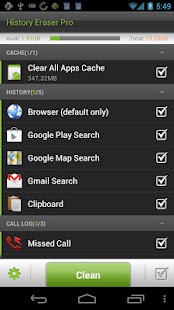
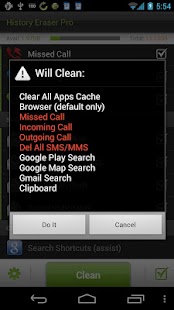
★Clear Browser History
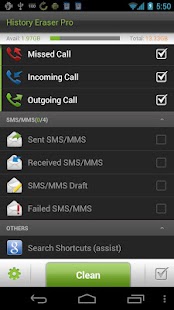
★Clear Call Log
★Clear text messages
★Clear Market Search History (including new android market history of v3.0.26+)
★Clear Google Map Search History
★Clear Gmail Search History
★Clear Clipboard Data
★Clear Youtube Search History (assist)
★Clear Google Search History(Android >= 1.6) (assistance)
★Clear all app cache files
★Clear Frequently Called (Frequently Contacted)
Feel free to send feedback to us other than 1 star!!
If forceclose happens, please use our another app named 'App Cache Cleaner' to do a clean-all action, and then open History Eraser again
#How to clean your Google Map historyIf your Google Map history still comes out after clean, please visit http://www.google.com/history to disable the history records for your Google account.
***************************INFOLIFE, Make Life Easier!***************************
----version 2.5.5 changes:1.add sms clear options to one touch clear listnow we can seperately del 4 kinds of thread,including:a) Sent SMS/MMSb) Received SMS/MMSc) Failed SMS/MMSd) SMS/MMS Draft
By using setting menu, you can alse choose not to del sms/mms when screen off or you can choose not to delete locked/protected sms/mms
----version 2.5 changes:1.add auto clear and preference settingyou can have schedule clear by menu-> setting -> select Clear When Screen Off.It will auto execute your last clear operation when screen off.you can also set notification bar icon here and turn on phone rom memory statistics display.
2.add frequently called (Frequently Contacted) clearsome devices have a frequently called list in favorites tab.now the delete operation of this list is available.
3.add phone memory status showingshow your phone rom memory statistics.you can see how much memory freed after clear.
4.use new text message deletion and move this function to menu optionstxt message deletion option moved to menu,you can delete all of your sms/mms by menu-> Del All SMS/MMS,Be ware that ALL of your text message will be deleted even if they are locked!
5.add option to show notification baryou can show notification bar to have a quick switch.to enable this:menu->Setting->check Notification Bar Icon.
6.adjust item display order.move clear all apps cache function to the top of the list.
***Features under development***1,contacts history or sms history in motorola phones:Motorola doesn't share their communication logs with other apps,I am still working on it to figure out a way to clear this history.
To help us translate thiss app to your native language, please sign up in http://crowdin.net/project/history-eraserthank you very much
About History Eraser Pro - Clean up
- Package name (App ID)
- mobi.infolife.eraserpro
- Available on
- Google Play
- Price
- Free
- Developer
- AVAST Software
Looking for the History Eraser Pro - Clean up APK?
The safest way to get History Eraser Pro - Clean up (mobi.infolife.eraserpro) on your Android device is to install it directly from Google Play — you'll always get the latest official version, automatic updates, and no risk of modified or infected APK files from third-party sites.
Social Features
Connect and share with friends and the community.
Gaming Features
Enjoy immersive gaming experience with various game modes.
Learning Tools
Enhance your learning experience with interactive features.
See History Eraser Pro - Clean up in Action
Frequently Asked Questions
Is History Eraser Pro - Clean up free?
Yes, History Eraser Pro - Clean up is free to download and install on Android through Google Play.
How do I install History Eraser Pro - Clean up on Android?
Open Google Play on your Android phone or tablet, search for History Eraser Pro - Clean up by AVAST Software or tap the Google Play button on this page, then tap Install. The app downloads and installs automatically.
What is mobi.infolife.eraserpro?
mobi.infolife.eraserpro is the App ID (package name) of History Eraser Pro - Clean up on Google Play. Every Android app has a unique package name, and it is the safest way to verify you are installing the official app.
Is History Eraser Pro - Clean up safe to download?
Installing History Eraser Pro - Clean up from Google Play is the safest option: you get the official version published by AVAST Software, verified by Google Play Protect, with automatic updates. Avoid APK files from unofficial third-party sites.
Get History Eraser Pro - Clean up Today
History Eraser Pro - Clean up for Android — free download on Google Play.
Compatible with Android phones and tablets — available on Google Play.
Ask AI about this app
Get instant answers about features, tips and more from popular AI assistants.